Samsung Galaxy A01 Core Motherboard Service
Published by TurboFix, Hyderabad · Last updated · 2 sources
Quick answer
A Galaxy A01 Core with a board fault — no power, no network, no charging despite a good port and battery — can often be fixed at component level on its MediaTek MT6739 board, keeping your data and IMEI. A replacement motherboard is the fallback; it starts with empty storage and a different IMEI.
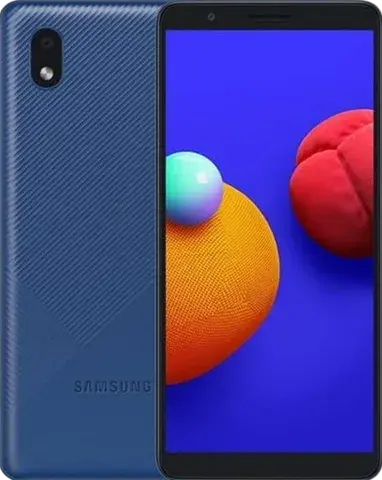
The Galaxy A01 Core is a 2020 Galaxy A phone built on the MediaTek MT6739 (4G) with an LCD display. Its motherboard holds the processor, memory, storage and radios, so a board fault can look like almost anything — a dead phone, no signal, no charging or constant restarts.
This page explains how board faults show up on the Galaxy A01 Core, what we rule out first, when board-level repair is possible, and what changes if the motherboard has to be replaced. We serve customers across Hyderabad at their doorstep, by pickup, or at our Nampally studio.
Serving all of Hyderabad and Secunderabad at your doorstep, with pickup and delivery, or at our walk-in studio: Bharat Nagar, Aghapura, Nampally, Hyderabad, Telangana 500001.
TurboFix is an independent service provider, not a Samsung service centre, and not affiliated with or endorsed by Samsung. Samsung and Galaxy are trademarks of Samsung Electronics.
Galaxy A01 Core motherboard service at a glance
- Chipset (India)
- MediaTek MT6739
- Launched in India
- 2020
- Series
- Galaxy A
- Display
- LCD
- Network
- 4G
- Price
- Quoted for your Galaxy A01 Core after diagnosis, before any work starts
- Warranty
- 3, 6 or 12 months depending on the part grade — confirmed with your quote
- Where
- Doorstep visit, pickup and delivery, or walk-in at our Nampally studio
How do I know my Galaxy A01 Core has a motherboard fault?
- No power and no vibration, even on a known-good charger
- Stuck on the Samsung logo or restarting in a loop after a software reinstall
- "No service" or "Emergency calls only" with a working SIM
- Wi-Fi or Bluetooth won't switch on
- Gets hot and drains even when idle
- Not charging after the port, cable and battery have been ruled out
- Screen dark but the phone rings, vibrates or shows up on a computer
- Faults that started after a drop or liquid exposure
What makes the Galaxy A01 Core's board different?
- Chipset: MediaTek MT6739 (the version sold in India). MediaTek chips (Helio and Dimensity) come with MediaTek's own power-management and radio chips, so board diagnosis follows MediaTek's platform design rather than Samsung's or Qualcomm's.
- Display: LCD — the backlight is driven by circuitry on the motherboard, so a dark screen on a phone that still rings can be a board fault rather than a broken display.
- Network: 4G only — this model can't connect to 5G, which is by design, not a fault.
- Twins: the Galaxy A01 Core is sold in India alongside the Galaxy M01 Core, which share the same hardware under a different name.
Where does the Galaxy A01 Core fit in Samsung's 2020 Galaxy A line-up?
Samsung's 2020 budget phones in India ranged from entry models on MediaTek and Snapdragon 400-series chips to mid-rangers built on the Exynos 9611, and were all 4G-only.
The MediaTek MT6739 is also used in the Galaxy M01 Core. Sharing a chip doesn't make boards interchangeable — layout, memory and radios differ — but the same chipset means the same platform-level diagnosis applies.
Board-level repair or a replacement motherboard?
Fixing the failed component on your Galaxy A01 Core's MediaTek MT6739 board keeps your data and IMEI. A replacement Galaxy A01 Core board starts with empty storage, reports a new IMEI and must be free of the previous owner's locks. On a 2020 phone, replacement boards are usually second-hand or refurbished, so component-level repair of your own board is often the better option. Our Samsung motherboard service guide explains data, Factory Reset Protection, Knox and IMEI in detail.
What do we rule out before blaming the Galaxy A01 Core's board?
- Battery: a failed battery can look exactly like a dead board, so we test with a known-good supply.
- Charging port and cable: a damaged USB-C port or sub-board stops charging without any board fault.
- Display and backlight: we check whether the LCD is lit before blaming the board.
- Software: a phone stuck on the logo may only need a software reinstall — though that erases data, so we discuss it with you first.
- Liquid damage: we inspect for corrosion around connectors and chips.
What should I check on my Galaxy A01 Core before booking?
- Note the model number from Settings > About phone (it starts with SM-) if the phone still turns on — it tells us exactly which board variant you have.
- Know your Google and Samsung account passwords — Factory Reset Protection will ask for them after board work.
- If the screen is dark, check with a torch whether a faint image is visible and tell us — it separates an LCD backlight fault from a dead board.
- The Galaxy A01 Core launched in India in 2020. At this age, weigh the cost of board work against the phone's value and how much the data on it matters to you — we'll help you compare honestly.
What do we test on your Galaxy A01 Core afterwards?
- Power-on, charging and battery drain at idle
- Calls and 4G mobile data
- Wi-Fi, Bluetooth and GPS
- Fingerprint and face unlock
- Front and rear cameras, speakers and microphones
- Even LCD backlight
- IMEI shown in Settings matches the board, and Samsung Wallet/Knox features where supported
How does the Galaxy A01 Core's board compare with related Galaxy phones?
| Model | Chipset · display · network |
|---|---|
| Galaxy A01 Core | MediaTek MT6739 · LCD · 4G |
| Galaxy M01 Core | MediaTek MT6739 · LCD · 4G |
| Galaxy A51 | Exynos 9611 · AMOLED · 4G |
| Galaxy A71 | Snapdragon 730 · AMOLED · 4G |
| Galaxy A31 | Helio P65 · AMOLED · 4G |
| Galaxy A21s | Exynos 850 · LCD · 4G |
The Galaxy M01 Core shares the Galaxy A01 Core's chipset (and, for its twins, the same hardware). Even so, we quote and source boards for your exact model number.
How does Galaxy A01 Core motherboard service work at TurboFix?
- 1
Diagnose
Battery, port, display and board are tested to find exactly what has failed on the Galaxy A01 Core.
- 2
Explain options
Component-level repair or replacement board — with the effect on data, IMEI and FRP — and a quote, before any work.
- 3
Repair or replace
Faulty components are replaced on your MediaTek MT6739 board, or a lock-free replacement board is fitted.
- 4
Test and document
Every function is tested and any IMEI change is recorded on your invoice.
Galaxy A01 Core motherboard service: frequently asked questions
Will I lose my data if the Galaxy A01 Core motherboard is replaced?
With a replacement board, yes — storage is part of the board and encrypted to it, so your data can only be restored from a backup (Smart Switch, Samsung Cloud or Google). If you need data from a dead phone with no backup, ask about board-level repair: reviving the original board is the only way to reach it.
Can a dead Galaxy A01 Core be fixed without replacing the motherboard?
Often, yes. Many no-power faults on the Galaxy A01 Core come down to one component in the MediaTek MT6739 platform's power or charging circuitry, a connector or liquid corrosion. We diagnose first and only suggest a replacement board when component-level repair isn't realistic.
Will my Galaxy A01 Core's IMEI change?
Only if the Galaxy A01 Core gets a replacement board — the IMEI belongs to the board. Component-level repair on your own board keeps your IMEI. Altering an IMEI is an offence in India and never part of a legitimate repair.
My Galaxy A01 Core screen is dark but the phone rings. Is it the motherboard?
It can be. The Galaxy A01 Core has an LCD whose backlight is powered from the board. Shine a torch at the screen: if you can faintly see the image, the LCD works and the backlight circuit (a board-level fault) or the display's own backlight is the likely cause. We test with a known-good display to tell which.
Can the Galaxy A01 Core be upgraded to 5G with a new board?
No. The Galaxy A01 Core is a 4G phone; 5G needs different radio hardware that this model doesn't have. A board replacement uses the same 4G design.
My Galaxy A01 Core stopped working after water damage. Can the board be saved?
Often, if it's looked at quickly. Liquid causes corrosion and shorts on specific parts of the board, and cleaning and replacing those parts can bring a phone back. Don't charge it or keep trying to switch it on.
How much does Galaxy A01 Core motherboard service cost?
It depends on whether a component-level repair works or a replacement board is needed, and on board availability for your exact variant. You get a quote after diagnosis and before any work, and you pay after the service.
Is Galaxy A01 Core board work done at my doorstep?
Board-level work needs a microscope and a soldering bench, so it may not be possible at your doorstep. We'll tell you when you book; pickup and delivery are available, or you can bring the phone to our Nampally studio.
Related pages
Motherboard service for related Galaxy phones
See also: Samsung motherboard service guide · Samsung service in Hyderabad · Motherboard service (all brands) · Water damage service · No fix, no fee policy · Warranty terms
Sources
Model facts on this page were checked against these sources in October 2026. Prices are not listed because they depend on the part and are quoted after inspection.
Galaxy A01 Core motherboard service across Hyderabad
Doorstep visits in every part of the city. Popular areas:
- Galaxy A01 Core motherboard service in Madhapur
- Galaxy A01 Core motherboard service in Gachibowli
- Galaxy A01 Core motherboard service in Ameerpet
- Galaxy A01 Core motherboard service in Dilsukhnagar
- Galaxy A01 Core motherboard service in Kondapur
- Galaxy A01 Core motherboard service in HITEC City
- Galaxy A01 Core motherboard service in Banjara Hills
- Galaxy A01 Core motherboard service in Kukatpally
- Galaxy A01 Core motherboard service in KPHB Colony
- Galaxy A01 Core motherboard service in Secunderabad
- Galaxy A01 Core motherboard service in LB Nagar
- Galaxy A01 Core motherboard service in Kompally
- Galaxy A01 Core motherboard service in SR Nagar
- Galaxy A01 Core motherboard service in Miyapur
- Galaxy A01 Core motherboard service in Nizampet
- Galaxy A01 Core motherboard service in Uppal
- Galaxy A01 Core motherboard service in Nagole
- Galaxy A01 Core motherboard service in Habsiguda
- Galaxy A01 Core motherboard service in Tarnaka
- Galaxy A01 Core motherboard service in Mehdipatnam
- Galaxy A01 Core motherboard service in Attapur
- Galaxy A01 Core motherboard service in Nampally
- Galaxy A01 Core motherboard service in Abids
- Galaxy A01 Core motherboard service in Koti
- Galaxy A01 Core motherboard service in Begumpet
Your Phone Deserves
The Best Care
Get transparent pricing and a clear service timeline before you commit. Book with TurboFix today for doorstep mobile service in Hyderabad. First-time customers get 10% off.